3DGS Training Full Pipeline Notes
(NVIDIA P104-100)
RealityScan 2.2 mobile photogrammetry → export to CSV / COLMAP format → 3D Gaussian Splatting (3DGS) modeling. A complete record of why the NerfStudio route is a dead end on the P104, how to set up the original 3DGS (INRIA) environment, plus a full step-by-step tutorial from data preparation to training verification and the measured results.
1. Preface
Project background: RealityScan 2.2 mobile photogrammetry → export to CSV / COLMAP format → 3D Gaussian Splatting (3DGS) modeling. This article covers: why the NerfStudio route is a dead end on the P104, how to set up the original 3DGS (INRIA) environment, a complete step-by-step tutorial from data preparation to training verification, and the actual measured results on the P104.
Companion document: "RealityScan2.2-NerfStudio-CSV Debugging Notes" (troubleshooting during the data conversion stage).
Companion scripts:fix_rc_csv.py,colmap_txt2bin.py,prepare_gs_data.py,build_all.bat,build_dgr.bat.
1.1 Data pipeline
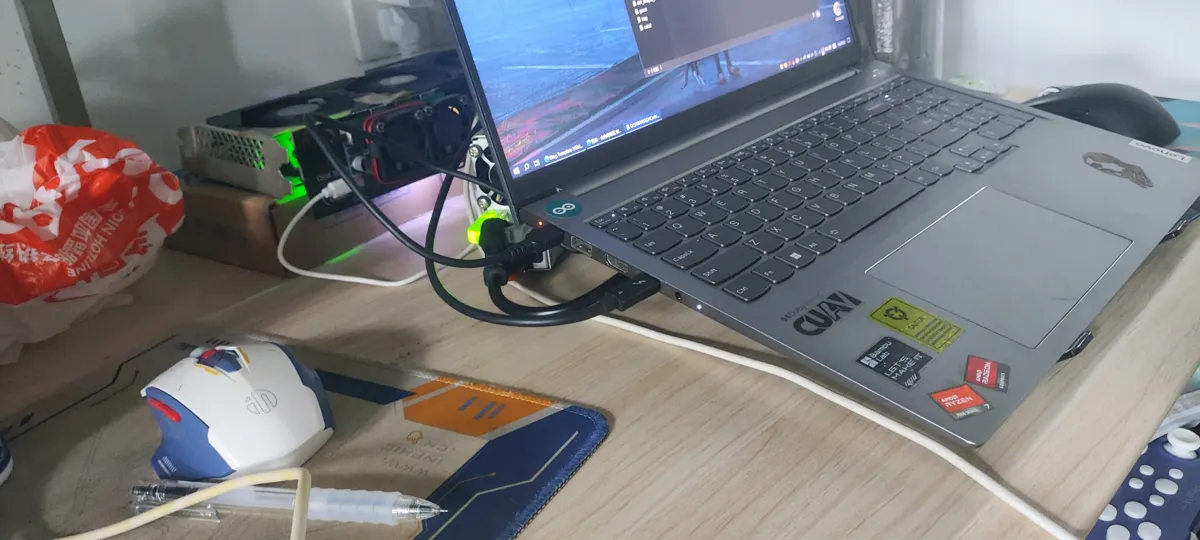
RealityScan 2.2 alignment (16 mobile photos)
  ├─ export 3.csv          → camera poses / intrinsics / distortion (Internal/External camera parameters)
  ├─ export images/        → matching COLMAP images (00000.png, already renamed)
  └─ export sparse/0/      → COLMAP sparse reconstruction (text format txt)

Final output of this pipeline: the trained 3DGS Gaussian point cloud (point_cloud.ply) + rendered images
1.2 Environment
| Item | Value |
|---|---|
| GPU | NVIDIA P104-100 (8 GB, Pascal architecture sm_61) |
| Driver / CUDA | 582.53 / system CUDA Toolkit 11.8 (nvcc 11.8.89) |
| Compiler | Visual Studio 2022 Community (MSVC 14.44) |
| Python | 3.10.11 |
| torch / torchvision | 2.4.1+cu118 / 0.19.1+cu118 |
| Training framework | gaussian-splatting (INRIA, main + diff-gaussian-rasterization dr_aa branch) |
| Training data | 16 images, 0.5x resolution (≈2250×1000) |
1.3 Document structure
- Chapter 2: Problems (why the NerfStudio route is blocked, all the issues hit during training)
- Chapter 3: Solution approach and option selection
- Chapter 4: Step-by-step tutorial (can be followed as-is)
- Chapter 5: Measured training results on the P104
- Chapter 6: Next steps; Chapter 7: Pitfall list; Chapter 8: Appendix
2. Problems
2.1 Core problem: NerfStudio's splatfacto cannot run on the P104
At the core of 3D Gaussian Splatting is a custom CUDA rasterizer; NerfStudio 1.1.5's splatfacto uses the open-source library gsplat. Investigation confirmed:
- The gsplat source build configuration explicitly comments:
build against architectures >= 7.0 (required by cooperative_groups::labeled_partition in gsplat); cooperative_groups::labeled_partitionis an independent thread scheduling feature introduced with Volta (sm_70) and does not exist on Pascal (sm_60/61) hardware;- The official prebuilt wheels only contain cubins for
sm_70/75/80/86/90, verifiable viacuobjdump -elf gsplat/csrc.pyd; even building it yourself cannot bypass the code-level dependency.
Conclusion: splatfacto requires a GPU architecture ≥ sm_70 (e.g. T4, V100, RTX 20 series+); the P104-100 (sm_61) has no choice but to switch approaches.
2.2 Problems encountered during training (overview)
Even with the original 3DGS, setting up the training environment was a chain of cascading problems (see the pitfall list in Chapter 7):
| # | Problem | Cause in one line |
|---|---|---|
| 1 | torch.cuda.is_available()=False | The CPU build of torch was installed |
| 2 | gsplat no kernel image available | See 2.1; hardware not supported |
| 3 | CUDA version (11.8) mismatches PyTorch (12.4) | torch's CUDA version does not match the system nvcc |
| 4 | STL1002: expected CUDA 12.4 or newer | The new STL in MSVC 14.44 rejects the older CUDA |
| 5 | unsupported Microsoft Visual Studio version | CUDA 11.8 does not recognize MSVC 14.44 |
| 6 | cv2 _ARRAY_API not found | numpy was accidentally upgraded to 2.x |
| 7 | colmap images.bin parsed as garbage | qvec/tvec mistakenly read as float32, should be float64 |
| 8 | antialiasing parameter error | The rasterizer branch does not match the main repo code |
| 9 | Backslashes lost from paths | A bash escaping issue |
3. Solutions (option selection)
| Option | Feasibility | Verdict |
|---|---|---|
| splatfacto (NerfStudio) + P104 | sm_61 not supported by the hardware | ❌ |
| splatfacto + cloud GPU (T4 etc.) | Feasible, but requires extra resources | Fallback |
| Original 3DGS (INRIA gaussian-splatting) | The CUDA rasterizer code is Pascal-compatible, widely verified by the community on GTX 10 series cards | ✅ Adopted |
Reasons for choosing the original 3DGS:
- Its
diff-gaussian-rasterizationrasterizer was written in 2023 (the CUDA 11 era) and supports Pascal well; - Our data already came in the COLMAP format the original 3DGS needs (exported from RealityScan), no need to redo feature matching/reconstruction;
- The sparse point cloud (23513 points) can directly initialize the Gaussians, making training faster and more stable.
3.1 Overall approach
Environment alignment (torch cu118 ↔ nvcc 11.8, numpy<2)
   → Get the source (main + submodules, dr_aa branch + glm)
   → Build the three CUDA extensions (MSVC + nvcc, bypassing the two-way version checks)
   → Data preparation (colmap txt→bin; images and intrinsics scaled 0.5x)
   → Training (7000-step verification) → Render verification (PSNR)
4. Step-by-Step Tutorial
4.0 Environment checks
# GPU and architecture
nvidia-smi --query-gpu=name,compute_cap,memory.total --format=csv
# Expected output: NVIDIA P104-100, 6.1, 8192 MiB

# CUDA toolchain (nvcc must exist)
nvcc --version

# Python dependency status
python -c "import torch; print(torch.__version__, torch.cuda.is_available())"
python -c "import numpy; print(numpy.__version__)"

# MSVC toolchain (just confirm cl.exe exists; the path is inside the VS install directory)
ls "/c/Program Files/Microsoft Visual Studio/2022/Community/VC/Tools/MSVC/"
4.1 Aligning the Python environment
Key rule: torch's CUDA version must match the nvcc version, otherwise torch cpp_extension refuses to compile outright.
# The system nvcc is 11.8 → install the cu118 build of torch (must use the official PyTorch index; the default index installs the CPU build!)
python -m pip install torch==2.4.1 torchvision==0.19.1 \
  --index-url https://download.pytorch.org/whl/cu118

# numpy must be <2 (binary extensions such as open-cv depend on numpy 1.x)
python -m pip install "numpy==1.26.4"

# Verify
python -c "import torch; print(torch.__version__, torch.cuda.is_available())"   # 2.4.1+cu118 True
python -c "import numpy; print(numpy.__version__)"                              # 1.26.4
⚠️
pip install --force-reinstallalso upgrades dependencies from the default index along the way (numpy→2.x, torch→CPU build) — a trap hit twice. Always double-check the versions afterwards.
4.2 Getting the source
Direct GitHub access (especially over the git protocol) is extremely unstable in this environment; downloading zips through the ghfast.top mirror is recommended:
cd /d/temp

# Main repo (main branch)
curl -L --retry 10 -o gs.zip "https://ghfast.top/https://github.com/graphdeco-inria/gaussian-splatting/archive/refs/heads/main.zip"
unzip -q gs.zip && mv gaussian-splatting-main gaussian-splatting

# rasterizer: must use the dr_aa branch (the main repo code passes the antialiasing parameter, which the main branch does not expose)
curl -L --retry 10 -o dgr.zip "https://ghfast.top/https://github.com/graphdeco-inria/diff-gaussian-rasterization/archive/refs/heads/dr_aa.zip"
unzip -q dgr.zip
mkdir -p gaussian-splatting/submodules/diff-gaussian-rasterization
mv diff-gaussian-rasterization-dr_aa/* gaussian-splatting/submodules/diff-gaussian-rasterization/

# simple-knn lives on the INRIA GitLab (not on GitHub!)
curl -L --retry 10 -o sknn.zip "https://gitlab.inria.fr/bkerbl/simple-knn/-/archive/main/simple-knn-main.zip"
unzip -q sknn.zip
mkdir -p gaussian-splatting/submodules/simple-knn
mv simple-knn-main/* gaussian-splatting/submodules/simple-knn/

# fused-ssim (used by metrics)
curl -L --retry 10 -o fssim.zip "https://ghfast.top/https://github.com/rahul-goel/fused-ssim/archive/refs/heads/main.zip"
unzip -q fssim.zip
mkdir -p gaussian-splatting/submodules/fused-ssim
mv fused-ssim-main/* gaussian-splatting/submodules/fused-ssim/

# glm (math library dependency of the rasterizer)
curl -L --retry 10 -o glm.zip "https://ghfast.top/https://github.com/g-truc/glm/archive/refs/tags/1.0.1.zip"
unzip -q glm.zip
mkdir -p gaussian-splatting/submodules/diff-gaussian-rasterization/third_party
cp -r glm-1.0.1/* gaussian-splatting/submodules/diff-gaussian-rasterization/third_party/glm/
4.3 Building the three CUDA extensions
Build prerequisites (already satisfied in 4.0/4.1): vcvars environment, nvcc 11.8, torch cu118, numpy<2.
Modify the three setup.py files: prepend two arguments to the start of the extra_compile_args["nvcc"] list (MSVC 14.44 is too new and CUDA 11.8 too old; each flag bypasses one side's version check):
"-allow-unsupported-compiler", "-D_ALLOW_COMPILER_AND_STL_VERSION_MISMATCH"The finished modified script can be found in readme/build_all.bat (the setup.py of all three submodules has already had the arguments added):
@echo off
call "C:\Program Files\Microsoft Visual Studio\2022\Community\VC\Auxiliary\Build\vcvars64.bat" >nul 2>&1
set PYTHONIOENCODING=utf-8
set DISTUTILS_USE_SDK=1
cd /d D:\temp\gaussian-splatting\submodules\diff-gaussian-rasterization
python setup.py install
cd /d D:\temp\gaussian-splatting\submodules\simple-knn
python setup.py install
cd /d D:\temp\gaussian-splatting\submodules\fused-ssim
python setup.py install
Execution and verification:
cd /d/temp/ReasonixChat/3/readme && cmd //c build_all.bat
cd /d/temp/gaussian-splatting
python -c "from diff_gaussian_rasterization import GaussianRasterizationSettings, GaussianRasterizer; print('dgr OK')"
python -c "import simple_knn; print('simple_knn OK')"
python -c "import fused_ssim; print('fused_ssim OK')"
Build time: the three extensions together take roughly 5-10 minutes (single-core ninja build).
4.4 Data preparation
The sparse/0 exported by RealityScan is in COLMAP text format, while the original 3DGS only reads the binary format, so a conversion is needed:
# 1) txt → bin (16 cameras / 16 images / 23513 points)
cd /d/temp/ReasonixChat/3
python readme/colmap_txt2bin.py

# 2) Scale the images and intrinsics together to 0.5x (to fit 8GB VRAM and training speed)
#    Output: D:\temp\ReasonixChat\3\gs_data (images/ + sparse/0/*.bin)
python readme/prepare_gs_data.py 0.5
Key points of colmap_txt2bin.py:
cameras.bin:[id(int32), model(int32), w(int64), h(int64), params(double...)]; PINHOLE=1 has 4 parameters (fx, fy, cx, cy);images.bin: qvec/tvec are float64 (double) — the easiest part to get wrong (COLMAP's officialReadImagesBinaryuses 8-byte doubles); followed bycamera_id(int32),name(ASCII+\0),num_points(uint64),(x,y double, point3D_id int64)...;points3D.bin:[id(int64), xyz(3×double), rgb(3×uint8), error(double), track_len(int64), (image_id int32, point2D_idx int32)...].
Key points of prepare_gs_data.py: 3DGS reads images at their original resolution and has no built-in scaling; when scaling the images, fx/fy/cx/cy and w/h must be scaled by the same factor, otherwise the camera geometry breaks.
4.5 Training
cd /d/temp/gaussian-splatting
PYTHONIOENCODING=utf-8 python train.py \
  -s "D:/temp/ReasonixChat/3/gs_data" \
  -m "D:/temp/ReasonixChat/3/gs_output" \
--iterations 7000| Parameter | Meaning |
|---|---|
-s | Data directory (containing images/ and sparse/0/); use forward slashes in paths (backslashes get swallowed under bash) |
-m | Output directory (model, checkpoints, logs) |
--iterations | Number of iterations, default 30000; the verification run uses 7000 first |
--eval | Optional: splits off 1/8 as a test set and reports test metrics |
Excerpt from the training log (the first run prompts you to convert points3D.bin to points3D.ply; this is normal):
Loading Training Cameras
Number of points at initialisation :  23513
Training progress: 100%|██████████| 7000/7000 [11:21<00:00, 9.49it/s, Loss=0.0155550]
[ITER 7000] Evaluating train: L1 0.009710725769400597 PSNR 36.59599494934082
[ITER 7000] Saving Gaussians
Training complete.
4.6 Render verification
cd /d/temp/gaussian-splatting
PYTHONIOENCODING=utf-8 python render.py \
  -m "D:/temp/ReasonixChat/3/gs_output" \
  -s "D:/temp/ReasonixChat/3/gs_data" \
  --iteration 7000
Output: gs_output/train/ours_7000/{renders,gt}/ and gs_output/test/ours_7000/.
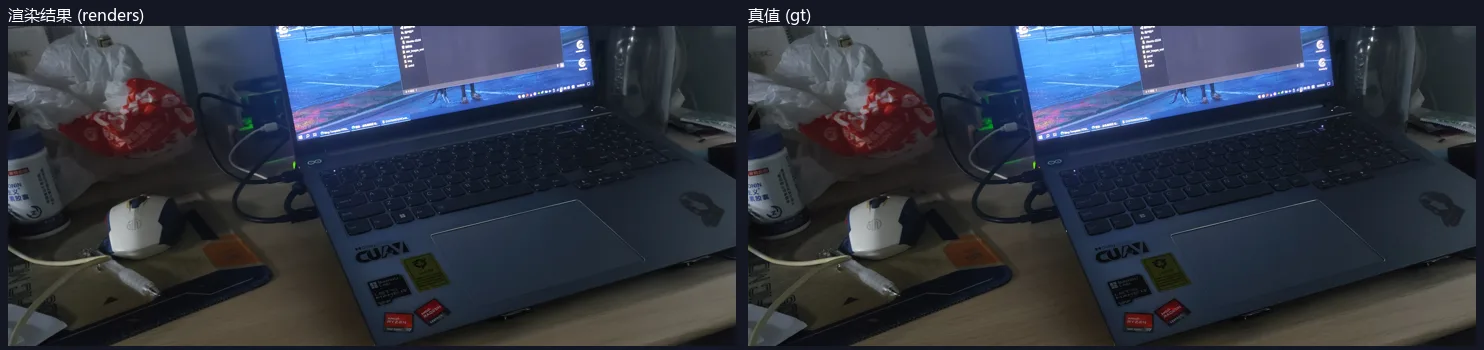
Compute the PSNR by comparing the rendered images against GT with a script:
import numpy as np
from PIL import Image
from pathlib import Path

r = Path("D:/temp/ReasonixChat/3/gs_output/train/ours_7000")
psnrs = []
for p in sorted((r / "renders").glob("*.png")):
    gt = np.asarray(Image.open(r / "gt" / p.name).convert("RGB"), dtype=np.float32) / 255.0
    pred = np.asarray(Image.open(p).convert("RGB"), dtype=np.float32) / 255.0
    mse = np.mean((pred - gt) ** 2)
    psnrs.append(10 * np.log10(1.0 / (mse + 1e-12)))
print(f"PSNR: mean={np.mean(psnrs):.2f} min={np.min(psnrs):.2f} max={np.max(psnrs):.2f}")
5. Measured Training Results on the P104
5.1 Training data
| Item | Value |
|---|---|
| Images | 16, 0.5x ≈ 2250×1000 (original 4500×2000) |
| Sparse point initialization | 23513 points |
| Iterations | 7000 |
| Training time | 11 min 21 s (about 9.5 it/s) |
| Loss convergence | 0.1606 → 0.0156 |
| Training set evaluation | PSNR 36.6 dB, L1 0.0097 |
5.2 Render verification (16 frames, compared against the input images)
| Metric | Value |
|---|---|
| Average PSNR | 37.24 dB |
| Min / Max | 30.17 / 39.92 dB |
Note: this is a render comparison from training-set viewpoints (pipeline verification); the numbers are already at a good level. To evaluate generalization, split off a test set with
--eval.
5.3 Outputs
gs_output/
├── point_cloud/iteration_7000/point_cloud.ply   ← trained Gaussian splatting point cloud (core artifact)
├── input.ply                                     ← sparse point initialization
├── cameras.json / exposure.json                  ← camera and exposure parameters
├── train/ours_7000/{renders,gt}/                 ← rendered images and ground truth
├── test/ours_7000/
└── events.out.tfevents.*                         ← TensorBoard logs
6. Next Steps
6.1 Full training (recommended, about 50 minutes)
cd /d/temp/gaussian-splatting
PYTHONIOENCODING=utf-8 python train.py \
  -s "D:/temp/ReasonixChat/3/gs_data" \
  -m "D:/temp/ReasonixChat/3/gs_output_full" \
  --iterations 30000
Output: gs_output_full/point_cloud/iteration_30000/point_cloud.ply.
6.2 Viewing and exporting
- SIBR viewer (the official real-time viewer; needs a separate build, see the repo's
SIBR_viewers/); - Render video directly:
render.pysupports--skip_train/--skip_testand custom trajectories; - The point cloud ply can be opened in CloudCompare / MeshLab to check quality.
6.3 Switching to a more suitable GPU (if you need the NerfStudio ecosystem)
gsplat requires sm_70+; after renting a T4 / RTX 20 series or newer GPU, output/transforms.json is ready to go, just run:
PYTHONIOENCODING=utf-8 ns-train splatfacto --data output --output-dir runs \
  --experiment-name myscan --max-num-iterations 30000 --vis tensorboard \
  nerfstudio-data --downscale-factor 2
7. Pitfall List (in order of occurrence)
| # | Symptom | Cause | Fix |
|---|---|---|---|
| 1 | torch.cuda.is_available()=False | The default index installed the CPU build of torch | Install the cu118/cu124 wheel from the official PyTorch index |
| 2 | gsplat no kernel image is available for execution on the device | gsplat does not support sm_61 (see 2.1) | Switch to the original 3DGS |
| 3 | DLL load failed while importing gsplat.csrc | The torch version does not match gsplat's prebuilt wheel (pt24) | This path is abandoned (gsplat is no longer needed); if you insist, downgrade torch to the version the wheel expects |
| 4 | The detected CUDA version (11.8) mismatches ... PyTorch (12.4) | torch's CUDA does not match nvcc | Switch torch to cu118 to align with nvcc 11.8 |
| 5 | unsupported Microsoft Visual Studio version | CUDA 11.8's host_config.h rejects MSVC 14.44 | Add -allow-unsupported-compiler to nvcc |
| 6 | STL1002: Unexpected compiler version, expected CUDA 12.4 or newer | The new STL of MSVC 14.44 rejects the older CUDA in turn | Add -D_ALLOW_COMPILER_AND_STL_VERSION_MISMATCH to nvcc |
| 7 | cv2 _ARRAY_API not found / numpy.core.multiarray failed to import | numpy was upgraded to 2.x by pip along the way | pip install "numpy==1.26.4" |
| 8 | glm/glm.hpp: No such file or directory | The rasterizer's third_party/glm sub-dependency is missing | Download glm and place it in third_party/glm/ |
| 9 | colmap binary reading throws UnicodeDecodeError | The qvec/tvec in images.bin were mistakenly read as float32 | Correct to float64 (<4d/<3d) |
| 10 | GaussianRasterizationSettings ... unexpected keyword 'antialiasing' | The rasterizer was built from the main branch, but the main repo code needs dr_aa | Switch to the dr_aa branch and rebuild |
| 11 | Could not recognize scene type | Path backslashes were swallowed by bash, so sparse detection failed | Pass arguments with forward slashes D:/temp/... |
| 12 | A DISTUTILS_USE_SDK warning aborts the build | torch cpp_extension requires the SDK environment to be declared explicitly | Add set DISTUTILS_USE_SDK=1 in the bat file |
| 13 | After --force-reinstall, torch became the CPU build / numpy became 2.x | pip reinstalled the dependencies from the default index | Use --no-deps, or double-check the versions after installing |
8. Appendix
8.1 File list
| File / Directory | Description |
|---|---|
readme/3DGS训练全流程记录.md | This document |
readme/RealityScan2.2-NerfStudio-CSV调试记录.md | Troubleshooting notes for the data conversion stage |
readme/fix_rc_csv.py | RealityScan 2.2 CSV column name mapping (includes --zero-k4) |
readme/colmap_txt2bin.py | COLMAP text → binary conversion |
readme/prepare_gs_data.py | Scales images + intrinsics together, generating the 3DGS data directory |
readme/build_all.bat | One-click build of the three CUDA extensions |
readme/build_dgr.bat | Builds the rasterizer alone |
gs_data/ | 3DGS input data (0.5x) |
gs_output/ | Training artifacts (7000 steps) |
output/ | NerfStudio conversion output (transforms.json, kept as backup) |
8.2 Theory notes
Why does the original 3DGS support Pascal while gsplat does not?
The rasterization core of 3D Gaussian Splatting organizes Gaussians per tile and performs parallel sorting/blending. The original diff-gaussian-rasterization (2023) is implemented with classic warp-level synchronization (__syncwarp / shared memory) — primitives that Pascal already has; gsplat, by contrast, brings in cooperative_groups::labeled_partition (Volta's independent thread scheduling) to achieve more efficient dynamic parallelism, at the cost of dropping Pascal. This is the classic trade-off of "the newer library is faster but pickier about hardware".
Note on the COLMAP coordinate system exported by RealityScan
- CSV export:
(E, N, U)right-handed system (x east, y north, z up / altitude); - COLMAP export:
(E, -U, N)right-handed system (camera center =(x, -alt, y)); the two differ by a fixed rotation, verified geometrically consistent via PnP reprojection; - The original 3DGS consumes COLMAP poses directly, with no need to care about the absolute coordinate system (it normalizes internally during training).
8.3 Reference links
- Official gaussian-splatting repository: https://github.com/graphdeco-inria/gaussian-splatting
- gsplat repository (with the arch >= 7.0 note): https://github.com/nerfstudio-project/gsplat
- simple-knn (GitLab): https://gitlab.inria.fr/bkerbl/simple-knn
- Official PyTorch wheel index: https://download.pytorch.org/whl/cu118
- ghfast.top acceleration mirror: https://ghfast.top/
Happy Reconstructing! 🎉