RealityScan 2.2 + NerfStudio
Data Conversion Troubleshooting Log
Use RealityScan 2.2 to align photos and export CSV and COLMAP formats, then convert them into transforms.json with NerfStudio's ns-process-data realitycapture to train 3DGS. A complete walkthrough of troubleshooting and fixing "CSV column name mismatch" errors.
Quick Summary
Use case: Align photos with RealityScan / RealityCapture 2.2 and export
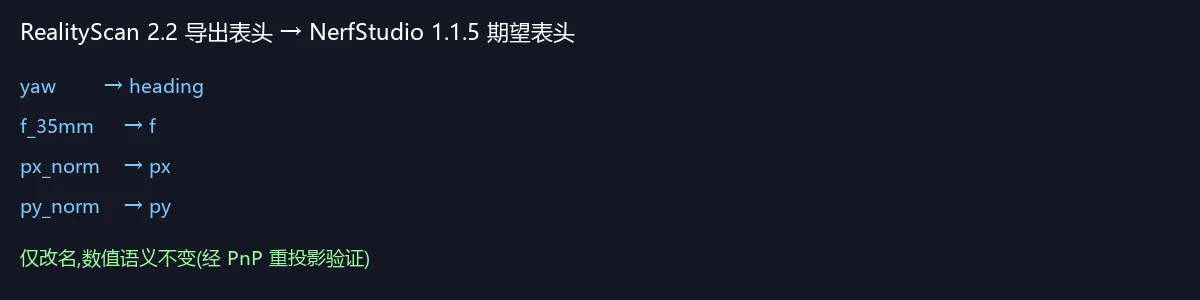
Internal/External camera parameters(CSV) and COLMAP format (sparse/,images/), then convert them intotransforms.jsonvia NerfStudio'sns-process-data realitycaptureto train 3D Gaussian Splatting.Root cause: The CSV header column names exported by RealityScan 2.2 do not match the column names the NerfStudio 1.1.5 source code expects (renamed only; the numeric semantics are unchanged). After fixing this with a column-name mapping script, the conversion succeeded, and independent verification via PnP reprojection on the sparse point cloud confirmed that the resulting camera poses are geometrically consistent with RealityScan's alignment results (reprojection error ~0.6 px).
1. Environment
| Item | Value |
|---|---|
| Operating system | Windows (command-line encoding GBK, bash shell) |
| GPU | NVIDIA P104 |
| Capture software | RealityScan 2.2 (RealityCapture 2.x series) |
| Reconstruction framework | NerfStudio 1.1.5 (Python 3.10.11) |
| Conversion command | ns-process-data realitycapture |
1.1 Data Directory Structure
D:\temp\ReasonixChat\3\
├── orin-images\          # original photos (taken with a phone): IMG_20260702_165925.jpg ~ IMG_20260702_170007.jpg, 16 in total
├── images\               # COLMAP companion images exported by RealityScan: 00000.png ~ 00015.png (renamed, 16 in total)
├── sparse\0\             # COLMAP sparse reconstruction exported by RealityScan (text format)
│   ├── cameras.txt       # 16 cameras, PINHOLE model (no distortion)
│   ├── images.txt        # poses (qvec + tvec) of the 16 images + 2D feature points
│   └── points3D.txt      # 23513 sparse 3D points
└── 3.csv                 # RealityScan 2.2 "Internal/External camera parameters" export, 16 lines
Note:
images/contains the images renamed by RealityScan when exporting COLMAP (00000.png…), which do not correspond to the original file names inorin-images/.
2. Symptoms
Running the standard conversion command reports an error:
ns-process-data realitycapture --data {data directory} --csv {csv file} --output-dir {output directory}2.1 First-Layer Symptom (Windows-Specific)
Running it directly throws a UnicodeEncodeError, which masks the real error:
UnicodeEncodeError: 'gbk' codec can't encode character '\U0001f389' in position 0: illegal multibyte sequenceCause: the Windows console defaults to GBK encoding and cannot print the 🎉 emoji that rich outputs. When NerfStudio catches the exception and prints the error message, it triggers the encoding exception again, so the real error content is never shown.
Remedy: add the environment variable and rerun to expose the real error:
PYTHONIOENCODING=utf-8 ns-process-data realitycapture --data orin-images --csv 3.csv --output-dir out_test2.2 Second-Layer Symptom (Wrong Data Directory)
With --data images (the renamed image directory from RC), there is no error but the result is empty:
Missing image data for 16 cameras.
Missing camera data for 16 frames.
Final dataset is 0 frames.
See 3.2 for the cause.
2.3 Third-Layer Symptom (The Core Error)
With --data orin-images (the original image directory), the real error surfaces:
File "...\nerfstudio\process_data\realitycapture_utils.py", line 82, in realitycapture_to_json
    frame["fl_x"] = float(cameras["f"][i]) * scale / 36.0
KeyError: 'f'
In other words, the CSV has no column named f.
3. Root Cause
3.1 Core root cause: CSV column names do not match what the NerfStudio source expects
In NerfStudio 1.1.5, realitycapture_utils.py::realitycapture_to_json() reads values by column name via csv.DictReader:
| Purpose | Column expected by NerfStudio 1.1.5 | Column actually exported by RealityScan 2.2 |
|---|---|---|
| Image file name | #name | #name ✅ |
| Position X | x | x ✅ |
| Position Y | y | y ✅ |
| Altitude | alt | alt ✅ |
| Yaw | heading | yaw ❌ |
| Pitch | pitch | pitch ✅ |
| Roll | roll | roll ✅ |
| 35mm-equivalent focal length | f | f_35mm ❌ |
| Normalized principal point x | px | px_norm ❌ |
| Normalized principal point y | py | py_norm ❌ |
| Radial distortion | k1~k4 | k1~k4 ✅ |
| Tangential distortion | t1, t2 | t1, t2 ✅ |
The key value-reading code in the source (realitycapture_utils.py, lines 65–98):
for i, name in enumerate(cameras["#name"]):          # line 65
    ...
    frame["fl_x"] = float(cameras["f"][i]) * scale / 36.0        # line 82 → KeyError: 'f'
    frame["cx"] = float(cameras["px"][i]) * scale + width / 2.0  # line 84
    frame["cy"] = float(cameras["py"][i]) * scale + height / 2.0 # line 85
    ...
    rot = _get_rotation_matrix(-float(cameras["heading"][i]),   # line 94
                               float(cameras["pitch"][i]),
                               float(cameras["roll"][i]))
Since all 16 frames hit the continue due to image-name matching failure before cameras["f"] is ever accessed (see 3.2), the program first shows "0 frames"; as soon as an image name matches, KeyError: 'f' fires immediately.
Why can we be sure it is just a rename with unchanged semantics?
- In the RealityCapture calibration template (calibration.xml), older versions wrote
headingin the header while the variable used to read that value was always$(yaw); RealityScan 2.2 simply changed the header toyaw.- Independent verification via PnP reprojection on the sparse point cloud (see Section 5) shows that after mapping the column names, the generated poses are geometrically consistent with RealityScan's COLMAP sparse reconstruction, proving that the numeric semantics of
yaw/pitch/rollandx/y/altare exactly the same as in the old version.
3.2 The --data Directory Must Point to the Original Images
NerfStudio's processing flow (process_data.py::ProcessRealityCapture.main):
- Collect images from the
--datadirectory and build animage_filename_mapkeyed by file name stem (extension removed). - Copy the images to the output directory and rename them to
frame_00000.jpgand so on (this does not affect matching, because matching happens on the original names before copying). - In
realitycapture_to_json(), look up each CSV#name(extension removed) inimage_filename_map.
Therefore:
- The CSV's
#namevalues are original file names likeIMG_20260702_165925.jpg→--datamust point toorin-images/. - If it points to
images/(00000.png),IMG_20260702_165925cannot be found → every frame is skipped →Missing image data for 16 cameras / Final dataset is 0 frames.
3.3 Secondary issue: Windows console GBK encoding
NerfStudio uses rich to output logs containing emoji, which the default GBK Windows console cannot encode; it throws a UnicodeEncodeError that overwrites the real exception message. When troubleshooting this kind of problem, it is advisable to always set PYTHONIOENCODING=utf-8.
4. Solution
4.1 One-click fix script: fix_rc_csv.py
Maps the RealityScan 2.2 header to the header NerfStudio expects and generates a new CSV (the original file is not modified).
"""Map RealityScan 2.2 CSV column names to the names nerfstudio 1.1.5 expects.

Usage:
    python fix_rc_csv.py <input.csv> [output.csv]

nerfstudio 1.1.5 realitycapture_utils.py expects:
    #name, x, y, alt, heading, pitch, roll, f, px, py, k1, k2, k3, k4, t1, t2
RealityScan 2.2 exports:
    #name, x, y, alt, yaw, pitch, roll, f_35mm, px_norm, py_norm, k1, k2, k3, k4, t1, t2
"""
import csv
import sys

COLUMN_MAP = {
    "yaw": "heading",
    "f_35mm": "f",
    "px_norm": "px",
    "py_norm": "py",
}

def main() -> None:
    if len(sys.argv) < 2:
        print(__doc__)
        sys.exit(1)
    src = sys.argv[1]
    dst = sys.argv[2] if len(sys.argv) > 2 else src.replace(".csv", "_nerfstudio.csv")
    with open(src, encoding="utf-8-sig", newline="") as fin, open(dst, "w", encoding="utf-8", newline="") as fout:
        reader = csv.DictReader(fin)
        fieldnames = [COLUMN_MAP.get(c, c) for c in reader.fieldnames]
        writer = csv.DictWriter(fout, fieldnames=fieldnames)
        writer.writeheader()
        for row in reader:
            writer.writerow({COLUMN_MAP.get(k, k): v for k, v in row.items()})
    print(f"written: {dst}")
    print("header:", fieldnames)

if __name__ == "__main__":
    main()
Header before and after the mapping:
- #name,x,y,alt,yaw,pitch,roll,f_35mm,px_norm,py_norm,k1,k2,k3,k4,t1,t2
+ #name,x,y,alt,heading,pitch,roll,f,px,py,k1,k2,k3,k4,t1,t2
4.2 Standard Workflow
# 1) Map column names (generates 3_nerfstudio.csv)
python fix_rc_csv.py 3.csv

# 2) Format conversion (--data must point to the [original] image directory; set PYTHONIOENCODING to avoid the GBK error)
PYTHONIOENCODING=utf-8 ns-process-data realitycapture \
  --data orin-images \
  --csv 3_nerfstudio.csv \
  --output-dir output
Expected output:
Started with 16 images
Final dataset is 16 frames.
Output artifacts: output/transforms.json + output/images/frame_00000.jpg … (with 2x/4x/8x downsampling).
4.3 Common Error Reference Table
| Symptom | Cause | Fix |
|---|---|---|
UnicodeEncodeError: 'gbk' codec can't encode ... '\U0001f389' | The Windows console's GBK cannot display rich emoji, masking the real error | Add PYTHONIOENCODING=utf-8 and rerun |
Missing image data for N cameras. / Final dataset is 0 frames. | --data points to RC's renamed image directory, so the CSV's #name values do not match | Point --data at the original image directory instead |
KeyError: 'f' | The CSV header has f_35mm instead of f | Run fix_rc_csv.py first to map the column names |
KeyError: 'heading' / 'px' / 'py' | Same as above; the same kind of missing column, triggered one after another | Same as above |
5. Verification Process (Technical Rigor)
After the fix, the generated output/transforms.json was independently verified at two levels, confirming that the conversion formulas themselves are correct and the problem was only the column names.
5.1 Numerical Sanity Check
Taking frame 0 as an example (original image 4524×2034; CSV row 0 has f_35mm=27.109 and px_norm=-7.9339e-3):
| Item | Formula (NerfStudio implementation) | Result |
|---|---|---|
fl_x = fl_y | f_35mm × max(w,h) / 36 | 27.109 × 4524 / 36 = 3406.71 |
cx | px_norm × max(w,h) + w/2 | -0.007934 × 4524 + 2262 = 2226.11 |
cy | py_norm × max(w,h) + h/2 | 0.002863 × 4524 + 1017 = 1029.95 |
| Translation | transform[:3,3] = (x, y, alt) | (-33.518, -27.171, 20.402) |
Every item matches the raw CSV data.
5.2 Cross-Validation Against the COLMAP Sparse Reconstruction (PnP Reprojection)
Using the 3D point cloud and 2D feature points from sparse/0, solve for each image's camera pose with cv2.solvePnP and compare it with the poses converted from the CSV:
- Reprojection error: mean 0.61 px (max 0.89 px) — the sparse reconstruction and the poses agree closely;
- Camera centers: the optical centers solved by PnP differ from the CSV positions
(x, y, alt)by ~0.01 m; - Rotation consistency: the CSV pose rotations differ from the COLMAP pose rotations by a single fixed rotation matrix (residual 0.000°), i.e. the relative poses among the 16 frames are fully consistent.
Conclusion: the CSV's yaw/pitch/roll and x/y/alt are geometrically consistent with RealityScan's alignment results, and NerfStudio's _get_rotation_matrix(-yaw, pitch, roll) convention (including negating yaw) fully applies to the data exported by this version.
5.3 Coordinate System Notes (Corroborating Evidence)
During verification it turned out that RC's COLMAP export and CSV export use different coordinate systems, which is normal:
| Export | World coordinate system |
|---|---|
CSV (Internal/External camera parameters) | (E, N, U) right-handed (x east, y north, z up/alt) |
COLMAP (sparse/) | (E, -U, N) right-handed (camera center = (x, -alt, y)) |
The two differ by a fixed rotation, and the tvec values in sparse/0/images.txt satisfy the standard COLMAP relation t = -R·C (numerical check residual ~1e-15), so the data is self-consistent. During training, NerfStudio runs the auto_orient_and_center_poses normalization, so absolute coordinate-system differences do not affect training.
6. Next Steps (Training 3D Gaussian Splatting)
6.1 Training
PYTHONIOENCODING=utf-8 ns-train splatfacto \
  --data output \
  --output-dir ./runs \
  --experiment-name myscan \
  --viewer.quit-on-train-completion True \
nerfstudio-data --downscale-factor 2- The original images are 4524×2034, too large for a P104 GPU;
--downscale-factor 2trains on 2x-downsampled images (about 2262×1017), balancing quality and VRAM; - Use the
ns-process-dataoutputoutput/(which containstransforms.json) as the training data directory.
6.2 Exporting the Gaussian Model / Point Cloud
# Export the trained model as a point cloud / mesh, etc.
ns-export gaussian-splat --load-config runs/myscan/splatfacto/2025-xxxx/xxxx/config.yml --output-dir exports
6.3 Viewing the Results
ns-viewer --load-config runs/myscan/splatfacto/2025-xxxx/xxxx/config.yml7. Lessons Learned and Caveats
- Version differences are the most common source of this kind of error: RealityScan 2.2 changed the CSV header (older versions used
heading/f/px/py), while NerfStudio 1.1.5 still parses the old column names. Before upgrading either side, check both sides' documentation. - Peel the onion when reading errors: on Windows, rich emoji can mask the real exception — set
PYTHONIOENCODING=utf-8first and look again; when the data directory does not match, the program does not error but outputs 0 frames, so do not be misled by an apparent "success". - Let the data speak: after mapping the column names, validate pose correctness with a PnP reprojection on the sparse point cloud, to avoid "it runs but the results are wrong".
- Keep the original export files: the script only generates a new CSV (
3_nerfstudio.csv) and leaves3.csvuntouched, making it easy to trace back. - Future versions: if you upgrade NerfStudio, first check whether its
realitycapture_utils.pyalready supports the newyaw/f_35mm/px_norm/py_normcolumn names (some newer versions do); if it does, no mapping is needed anymore.
Appendix
Appendix A: Key Files and Commands Quick Reference
The utility scripts and docs all live in the project's
readme/directory (fix_rc_csv.py,colmap_txt2bin.py,prepare_gs_data.py,build_all.bat, etc.).
| File | Description |
|---|---|
3.csv | Raw RealityScan 2.2 export (16 lines, including the header) |
3_nerfstudio.csv | CSV after column-name mapping (used by ns-process-data) |
fix_rc_csv.py | Column-name mapping script (reusable, parameterized input/output, located in readme/) |
output/transforms.json | Conversion output, used by ns-train |
Core commands:
python fix_rc_csv.py 3.csv
PYTHONIOENCODING=utf-8 ns-process-data realitycapture --data orin-images --csv 3_nerfstudio.csv --output-dir output
Appendix B: Key Locations in the NerfStudio Source (1.1.5)
nerfstudio/process_data/realitycapture_utils.pyrealitycapture_to_json(): lines 30–118, CSV parsing andtransforms.jsongeneration;- Column access points: line 65 (
#name), 82–91 (f/px/py/k1~k4/t1/t2), 94–98 (heading/pitch/roll/x/y/alt).
nerfstudio/scripts/process_data.pyProcessRealityCapture.main(): lines 338–415, image copying and the invocation entry point;--datais the original image directory.
Appendix C: Training Run Log (P104 + Original 3DGS, 2026-08-13)
This section is a brief training log. For the complete 3DGS Full Training Walkthrough (step-by-step tutorial, underlying principles, and a pitfall checklist), see the companion article in this series.
C.1 Hardware Limitation: nerfstudio splatfacto Cannot Run on the P104
- The P104-100 is Pascal architecture (sm_61), while
gsplat, which splatfacto in nerfstudio 1.1.5 depends on, requires GPU architecture ≥ sm_70 (Volta or newer). The gsplat source build config states explicitly:build against architectures >= 7.0 (required by cooperative_groups::labeled_partition in gsplat). - The official prebuilt wheels only contain
sm_70/75/80/86/90, notsm_61; this is a code-level dependency that cannot be bypassed even by compiling gsplat yourself. - Conclusion: splatfacto cannot run on the P104; an alternative that supports Pascal is required.
C.2 Alternative: Original 3DGS (INRIA gaussian-splatting)
The user chose original 3DGS (its CUDA rasterization code supports Pascal). For the full setup process, see the 3DGS Full Training Walkthrough. Key points:
1) Aligning the Python/CUDA environment (torch and nvcc versions must match)
| Component | Version | Notes |
|---|---|---|
| CUDA Toolkit | 11.8 (preinstalled on the system) | nvcc 11.8.89 |
| torch / torchvision | 2.4.1+cu118 / 0.19.1+cu118 | Matched to nvcc 11.8 (the cu124 build installed earlier for nerfstudio did not match and had to be reinstalled) |
| numpy | 1.26.4 | Must be <2 (open-cv 4.8.1 etc. have binary dependencies on numpy 1.x) |
Note:
pip install --force-reinstallupgrades dependencies (such as numpy and torch) from the default index; it twice caused numpy to revert to 2.x and torch to revert to the CPU build. Be sure to use--no-depsor double-check after installing.
2) Source code and submodules (direct GitHub access is unstable; use the ghfast.top mirror)
# gaussian-splatting (main) + three submodules + glm
if git clone fails, use instead: curl -L -o gs.zip "https://ghfast.top/https://github.com/graphdeco-inria/gaussian-splatting/archive/refs/heads/main.zip"
# note that diff-gaussian-rasterization must use the dr_aa branch (the main repo code calls the antialiasing parameter):
curl -L -o dgr.zip "https://ghfast.top/https://github.com/graphdeco-inria/diff-gaussian-rasterization/archive/refs/heads/dr_aa.zip"
# simple-knn is on INRIA GitLab: https://gitlab.inria.fr/bkerbl/simple-knn
# fused-ssim (used by metrics): https://github.com/rahul-goel/fused-ssim
# glm (rasterizer dependency): https://github.com/g-truc/glm → submodules/diff-gaussian-rasterization/third_party/glm
3) Building the three CUDA extensions (vcvars64 + nvcc 11.8)
@echo off
call "C:\Program Files\Microsoft Visual Studio\2022\Community\VC\Auxiliary\Build\vcvars64.bat"
set DISTUTILS_USE_SDK=1
cd /d D:\temp\gaussian-splatting\submodules\diff-gaussian-rasterization
python setup.py install
cd /d D:\temp\gaussian-splatting\submodules\simple-knn
python setup.py install
cd /d D:\temp\gaussian-splatting\submodules\fused-ssim
python setup.py install
The extra_compile_args["nvcc"] of the three setup.py files need the following appended (two version checks: MSVC 14.44 is too new and CUDA 11.8 is too old):
"-allow-unsupported-compiler", "-D_ALLOW_COMPILER_AND_STL_VERSION_MISMATCH"4) Data preparation (RealityScan's COLMAP export is in text format, and 3DGS only reads binary)
# txt → bin (official COLMAP binary format; qvec/tvec are float64, easy to get wrong)
python tmp/colmap_txt2bin.py
# scale images + intrinsics together to 0.5x (for P104 VRAM/speed; 3DGS has no built-in scaling)
python tmp/prepare_gs_data.py 0.5
# output: D:\temp\ReasonixChat\3\gs_data (images/ + sparse/0/{cameras,images,points3D}.bin)
5) Training and render verification
cd D:\temp\gaussian-splatting
python train.py -s D:/temp/ReasonixChat/3/gs_data -m D:/temp/ReasonixChat/3/gs_output --iterations 7000
python render.py -m D:/temp/ReasonixChat/3/gs_output -s D:/temp/ReasonixChat/3/gs_data --iteration 7000
6) Measured results (P104-100, 8GB, 0.5x resolution ≈2250×1000)
| Metric | Value |
|---|---|
| Training speed | ~9.5 it/s; 7000 steps took 11 min 21 s |
| Loss convergence | 0.16 → 0.015 |
| Training set evaluation | PSNR 36.6 dB, L1 0.0097 |
| Average PSNR over the 16 rendered frames | 37.24 dB (min 30.17 / max 39.92) |
| Output | gs_output/point_cloud/iteration_7000/point_cloud.ply |
7) Full training (optional)
python train.py -s D:/temp/ReasonixChat/3/gs_data -m D:/temp/ReasonixChat/3/gs_output_full --iterations 30000Expected to take ~50 minutes, producing point_cloud/iteration_30000/point_cloud.ply; for viewing you can use the official SIBR viewer, or render/export directly.
C.3 Pitfall Checklist (Training)
| Symptom | Cause | Fix |
|---|---|---|
torch.cuda.is_available()=False | The CPU build of torch was installed | Install the cu118/cu124 wheel from the official PyTorch index |
gsplat no kernel image is available | gsplat does not support sm_61 | Drop splatfacto and switch to original 3DGS |
The detected CUDA version (11.8) mismatches ... PyTorch (12.4) | torch's CUDA and nvcc versions do not match | Switch torch to cu118 to align with nvcc 11.8 |
STL1002: expected CUDA 12.4 or newer | The new STL in MSVC 14.44 rejects the older CUDA | Add -D_ALLOW_COMPILER_AND_STL_VERSION_MISMATCH to nvcc |
unsupported Microsoft Visual Studio version | CUDA 11.8 does not recognize MSVC 14.44 | Add -allow-unsupported-compiler to nvcc |
_ARRAY_API not found (cv2 fails to import) | numpy was upgraded to 2.x | pip install "numpy<2" |
UnicodeDecodeError ... image_name | qvec/tvec in colmap images.bin were written as float32 | Correct them to float64 (<4d/<3d) |
GaussianRasterizationSettings ... unexpected keyword 'antialiasing' | The rasterizer was built from the main branch; the main repo code needs dr_aa | Switch to the dr_aa branch and rebuild |
| Backslashes in paths get lost | bash escaping | Pass arguments with forward slashes D:/temp/... |
Happy Reconstructing! 🎉