The Great Drone Dept. Guidebook —
Internet Literacy
Old File Archive
1. First, uninstall 360 and XX PC Manager and every piece of software related to them.
Of course, step one is learning how to uninstall cleanly. Here are a few programs I commonly use:
- Geek Uninstaller Free (lightweight) — https://geekuninstaller.com/download
- revo uninstaller pro cracked version — https://www.nobyda.com/10770.html
I recommend installing Huorong — it lets you turn off Windows Defender, which is quite convenient.
2. Standardize your unarchiver: bandizip
(If you don't want the occasional popup, you can go download the portable version or version 6.29: https://blog.csdn.net/weixin_41961749/article/details/151298789
Of course you can also use 7-zip, though its UI is rather plain, and the checksum position of the 7z format is a bit unusual — no big deal, though.)
3. Standardize your office suite: Microsoft Office
Nothing to say.
4. Standardize your browser: Google Chrome or Microsoft Edge
(Recommended. If you'd rather use Firefox, Brave, Opera, or Safari, that's fine too — just as long as it's not a Chinese-made browser.)
5. Standardize your search engine: Microsoft Bing
(The information density of Baidu's results is way too low. Bing has ads too, but it beats that Baidu pile by a huge margin.)
2. Browser Extensions (Recommended Actions)
Ads bad. Extensions kill ads. Extensions good.
Ads in China are piled up like a mountain these days — without an extension I'm not even in the mood to go online. Filtering out ad interference greatly raises your odds of finding useful information, and it also improves your focus and your efficiency at getting things done. This is one of the most directly useful things about being online. Ad-blocking extensions can be downloaded straight from your browser's extension store (for MS Edge, official site: https://microsoftedge.microsoft.com/addons); the brute-force miracle worker I recommend is: uBlock Origin. But what we really push is the extension platform (yes, extensions inside extensions): Tampermonkey (one of its former names: Greasemonkey).
One more thing to stress: what this filters out is "hard ads" — the obvious ads out in the open, like trash popups and those sidebar "Legend" ads promising 999 with one slash. Against AI-generated junk posted on websites and deliberately planted "soft ads", it is powerless; you still have to judge for yourself.
Below is the concrete installation tutorial (using MS Edge as an example): https://blog.csdn.net/weixin_43881375/article/details/140170406
Greasy Fork, however, is blocked, so you can try your luck on that userscript site of its kind. I exported some of the extensions I use myself (see attachment: tampermonkey-backup-chrome.zip), which is enough for everyday basic searching. Below are the concrete import steps:
- First, open Tampermonkey's dashboard
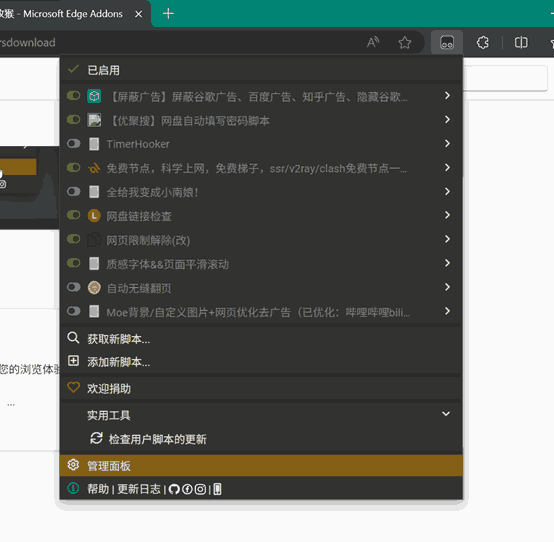
- Then go to the Utilities screen

- Import from file
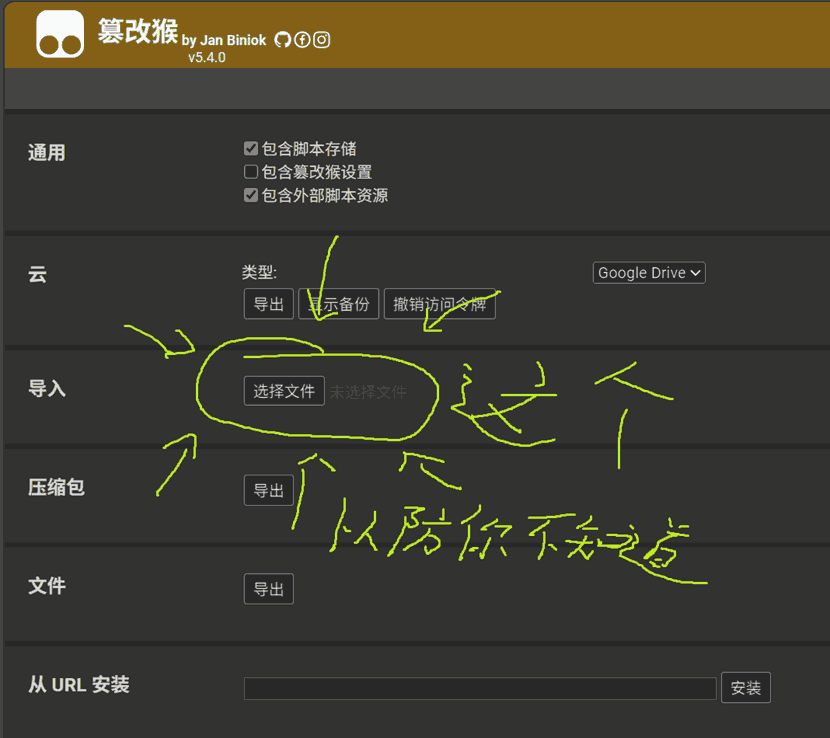
Then pick the downloaded archive — importing everything by default is fine, though you can also browse through and see what's inside. Click Import.

- Finally, you can go back and hit update on the extensions, since my export is a bit out of date. Of course, skipping that is fine too.
3. The Internet
If you've finished everything above, then,
You have to know where to look for things.
First of the first, websites that want your money are all idiots.
1. First, the ***search engine*** web results:
The first to rule out is Baidu Knows — a pure AI cesspool. Even Baidu Tieba is ten thousand times better.
Then I recommend GitHub and CSDN:
- GitHub is an international code site holding endless knowledge and cutting-edge wisdom (even hardware or other things); it is an indispensable place when learning anything software-related. That said, its interface is entirely in English and it has its own set of operating logic — it takes some getting used to and digging into, it's challenging, and its ceiling is unlimited.
- CSDN is domestic, entirely in Chinese, with fairly rich material; it's easy to get started with and perfectly fine for actually learning things. But it contains plenty of AI-generated shit, and in recent years more and more of it has become paywalled (its true nature is showing).
Beyond these two, some refined blogs turned up by web search may also contain quality content (small chance). And there are some sketchy sites where you can sometimes find things too.
In addition, there are WIKI-like sites made by companies or organizations (like the tutorial for one of Wildfire's boards, or the PX4 official website) where you can learn a lot, sometimes even first-hand material.
Look more, judge more, and 98% of the time you'll easily find what you want. The remaining 2% of niche questions will take you some time and deep searching, because the answer may sit in one row of one website among pages of results.
Of course, if you can't find it right off the bat, most likely your search method is wrong, there's a typo, or you're searching for the wrong thing. Make good use of keyword searches and your search engine's suggestions.
2. Then come the ***video sites***:
Those who know, know. I only want to remind you: watching videos can broaden your horizons to a certain degree, so stop staying cooped up in that useless broken information cocoon of yours every day. Go observe the diversity of the world, and get to know that countless knowledge out there.
Video and paper (well, screen paper) are two different media, and people's preferences differ. You can choose whichever way you like —
Exercise your own initiative; don't be confined by what I say
— as your way to learn, with other methods as supplements. Just like this: every operation mentioned above, including my opinions, can be found in identical or similar form on video sites.
It comes down to two: Bilibili & Douyin
I don't use Douyin, so no comments from me.
Virtual substitute:
On Bilibili there's lots and lots of good stuff knowledge-wise. Pick ones that aren't too short — they more or less all have something to offer.
3. And then there's ***AI***:
AI is better than me.
Ex. Epilogue
"Idle boast the strong pass is a wall of iron; with firm strides we are crossing its summit."
All of the above is just the tip of the iceberg. This is, theoretically speaking, what I believe a qualified internet user's baseline qualities should be. But it's enough to spend some time internalizing and settling into, because these days the factory default parameters of the average college student are basically all negative. In short, I hope you come away with some ideas, learn something, improve something, spark some motivation and enthusiasm, and put it to use in the process of solving the real-life difficulties that come one after another. And also: ask less, "why can't I find anything?"