NW-HTMLviewer: User Guide for a Mobile HTML Editing and Preview Tool
An HTML editor and full-screen preview app for Android: a built-in CodeMirror 6 editor, dual rendering engines (system WebView / GeckoView), offline resource caching, and full file management. This article introduces its features and how to use it.
NW-HTMLviewer is an industrial-grade mobile HTML editor and full-screen preview app with a native Material 3 style and an entirely Chinese interface, suited for editing, previewing, debugging, and managing HTML pages on a phone.





1. Project Overview
When editing HTML pages on a phone, an ordinary text editor only lets you see the source code and not the result, while a browser only shows the result but can't change the content. NW-HTMLviewer integrates "edit, preview, debug, manage" into a single app: you see the rendered result in real time as you write code, backed by file management, offline caching, encoding compatibility, and other companion capabilities, turning the phone into a lightweight HTML workspace.
2. Features
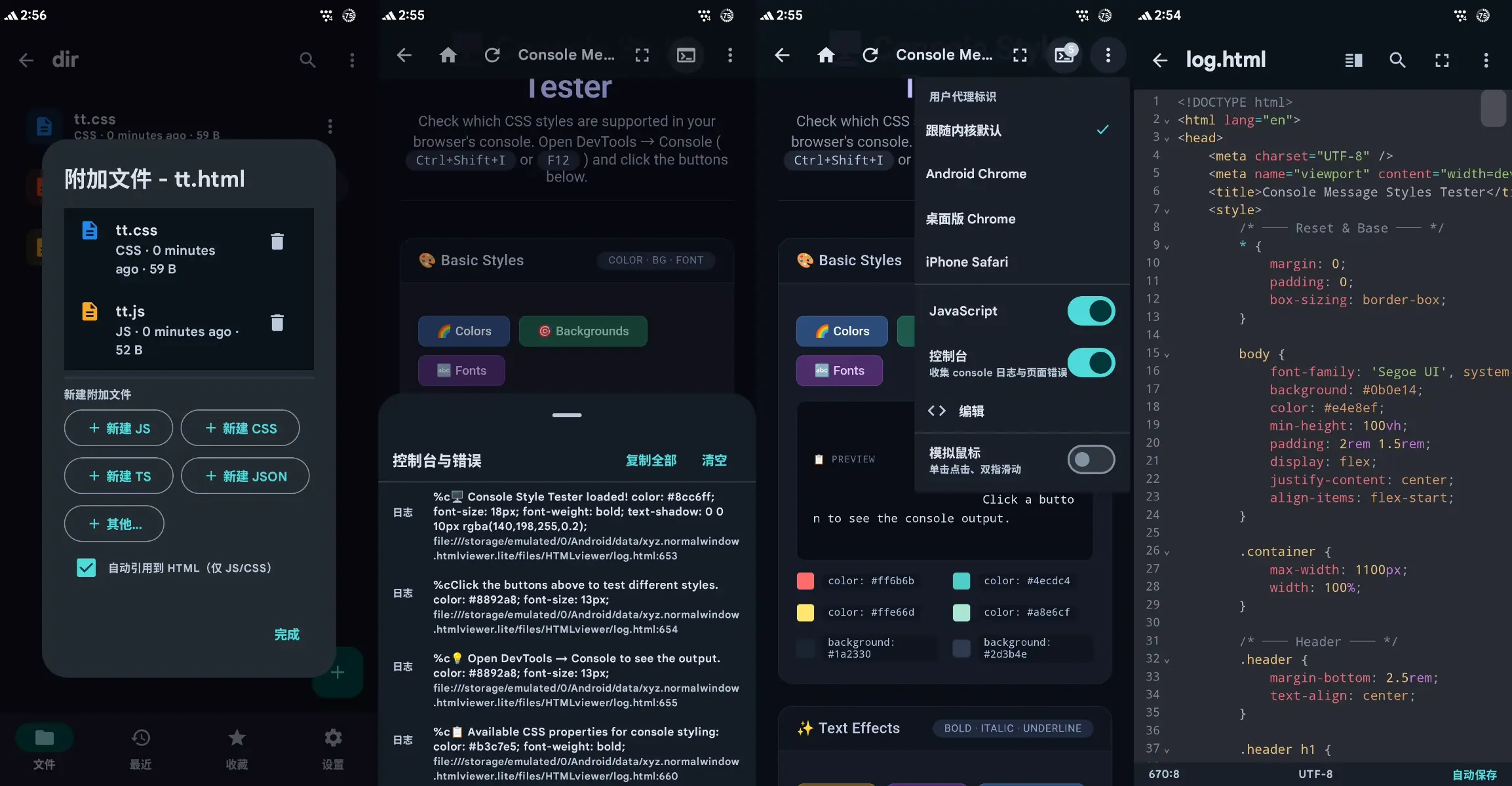
- Code editing: built-in CodeMirror 6 (bundled offline), with HTML / CSS / JS syntax highlighting, line numbers, auto-indent, bracket matching, find & replace, undo/redo, and one-tap format cleanup
- Live preview: split-screen live preview (what you edit is what you see, debounced refresh) and full-screen immersive preview (hides the system bars)
- Browser-style preview: forward / back / refresh, UA string switching, JS toggle, immersive mode, simulated mouse (touchpad-style cursor / tap / two-finger scrolling), console and error drawer
- Dual rendering engines: lightweight mode (system WebView) and compatibility mode (built-in GeckoView 153), switchable at any time
- Offline resource cache: web resources are persisted locally after the first download; while the URL stays unchanged they can be used offline directly
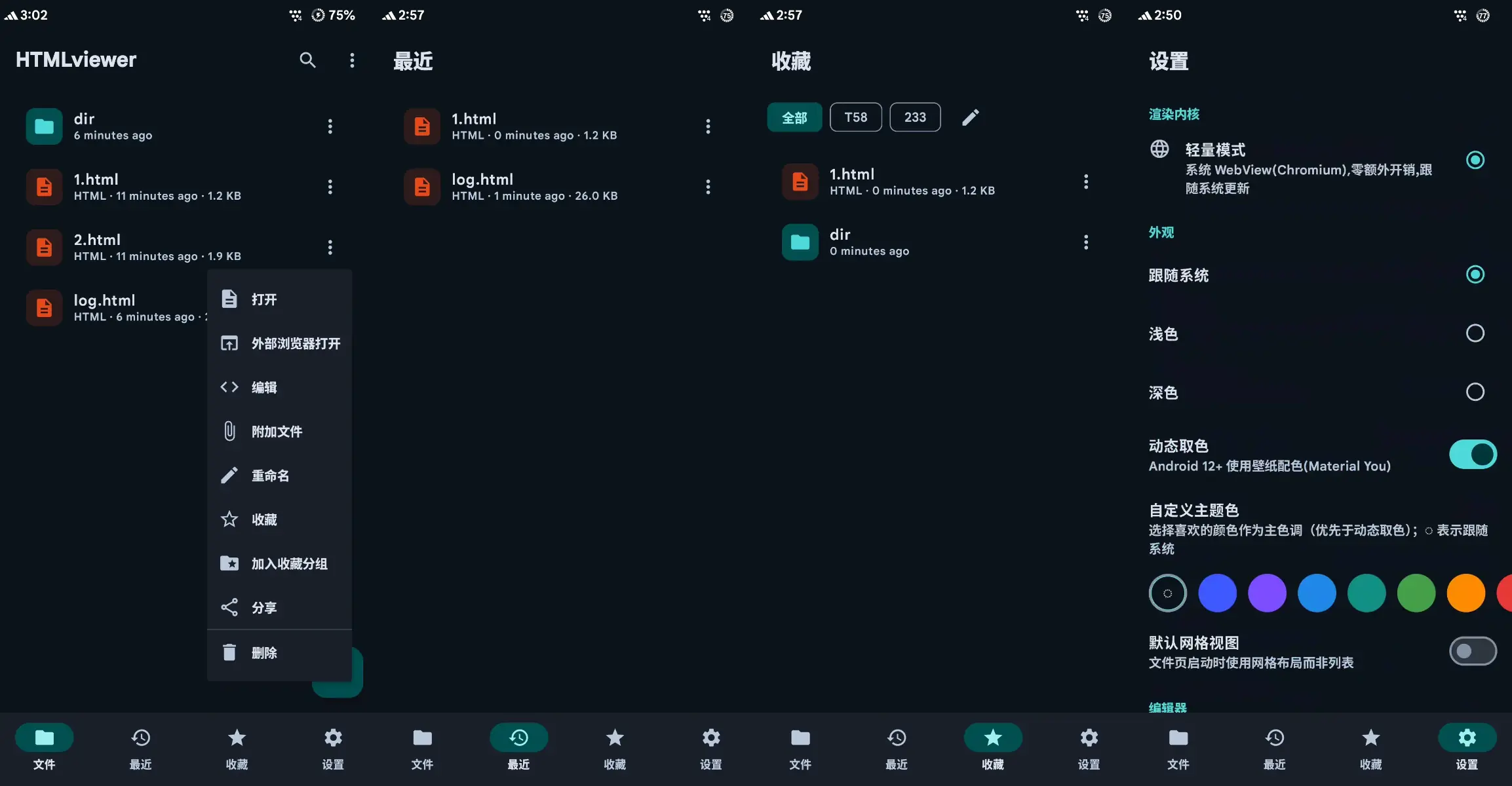
- File management: directory browsing, list / grid views, live search, recent files, favorites, multi-select batch operations, 5-second undo for deletes, and new files from built-in templates
- Encoding compatibility: auto-detects UTF-8 / GBK / UTF-16; legacy GBK files can be converted to UTF-8 in one tap
- Friendly settings: theme follows system / light / dark with dynamic color extraction, editor font size / indent / autosave / word wrap, immersive mode
3. Quick Start
The app's file root directory is app-specific storage (no storage permission needed), and it's ready to use right after installation. Below are the common workflows.
3.1 Creating and Opening Files
In the home screen's file manager, enter any directory and tap the new-file button to start from a built-in template or an empty file. Saved files appear in the directory list, with list / grid views and live search, and recent files and favorites keep frequently used files within easy reach.
3.2 Editing and Live Preview
Edit the code in the editor and turn on split-screen mode to write and watch at the same time — changes refresh automatically with debouncing. When you need to focus on the result, switch to full-screen preview for immersive mode, hiding the system bars for the largest possible view.
3.3 Browser-Style Preview
The preview screen supports forward / back / refresh, can switch the UA string to mimic different browsers, and can toggle JS scripts. On touch devices you can use the simulated mouse to operate the page (touchpad-style cursor, tap, two-finger scrolling), and the console and error / warning drawers help you locate page problems.
3.4 Switching Rendering Engines
Choose the rendering engine in Settings: lightweight mode uses the system WebView with zero extra overhead, suitable for the vast majority of scenarios; compatibility mode uses the built-in GeckoView 153 with fixed rendering behavior, suitable for pages that need stable, consistent output. The switch takes effect in the preview immediately (slower first-time initialization is normal).
3.5 Offline Resource Cache
The first time a page containing CDN or other web resources loads, the app downloads the resources and persists them into a hidden folder next to the HTML file; from then on, as long as the URL stays unchanged, the page displays fine even offline. The cache can be toggled in Settings, with manual clear-and-refresh supported.
3.6 File Management Tips
Long-press a file to enter multi-select mode for batch delete, move, copy, or share; accidentally deleted files can be restored directly via the bottom toast within 5 seconds. When opening legacy-encoded (e.g. GBK) files the app detects the encoding automatically, and you can also convert them to UTF-8 in one tap to avoid garbled text.
4. Build and Releases
The project builds with Gradle; dependencies are configured with China-based mirrors, so it compiles directly in a mainland-China environment. Release artifacts are split by ABI (arm64-v8a / armeabi-v7a / x86 / x86_64); the vast majority of devices only need the arm64-v8a package.
- Full version: includes the GeckoView compatibility engine, feature-complete (about 185 MB)
- Lite version: system WebView only, about 99% smaller (about 2.2 MB), no compatibility mode
If you want to build from source yourself, running the Gradle command for the corresponding task produces Debug / Release or Lite variant packages.
5. Known Limitations
- Simulated mouse, console capture, and offline resource caching are only supported by the system WebView engine; the Gecko engine uses a persistent disk cache
- The file root directory is app-specific storage; external directory browsing (SAF) is not yet implemented
- GeckoView cannot load the app's built-in resources directly; in-memory HTML preview uses a special loading scheme, and relative resource paths are not resolved in split-screen preview
6. Summary
NW-HTMLviewer brings the desktop HTML workflow onto an Android phone: professional editing, WYSIWYG preview, reliable offline caching, and file management. If you often need to view or tweak web pages on mobile, give it a try.
Project: NW-HTMLviewer (v1.0.0), License: GPL-3.0